

AI and Design Systems: A Practical Guide
A design system is a collection of reusable components, visual styles, and rules for building your product. It helps teams create consistent interfaces without starting from scratch each time.
AI can use that same system to generate designs and code based on the components your team already uses. It can also help update those components and check whether they’re being used correctly.
This can reduce repetitive design and development work. But AI needs access to your system and clear instructions about what to build.
In this guide, you'll learn how to:
Prepare your design system for AI
Connect AI tools to your existing components
Choose a useful first project
Check the designs and code AI produces
Keep your system up to date
Measure whether AI saves your team time
Let’s start with where AI can help.
How AI works with design systems

Table of Content

ABOUT THE AUTHOR

CEO and UX Practitioner
Bansi Mehta is leading voice in healthcare UX who has spent over 15 years making complex products feel clear, capable and human. She is equal parts design romantic and technologist - drawn to the elegance of beautifully simple interfaces whilst remaining endlessly curious about AI and the future of human-computer interaction.
As founder and CEO of Koru UX, an award-winning design agency, Bansi leads 45+ designers who have completed more than 1,500 UX projects to improve the way millions of users interact with technology.

AI can help with two kinds of work: building products with your design system and improving the system itself.
When building a product, an AI tool can use existing buttons, forms, and page layouts to assemble an interface. To do that reliably, it needs the component code, supported options, and examples of how to use them.
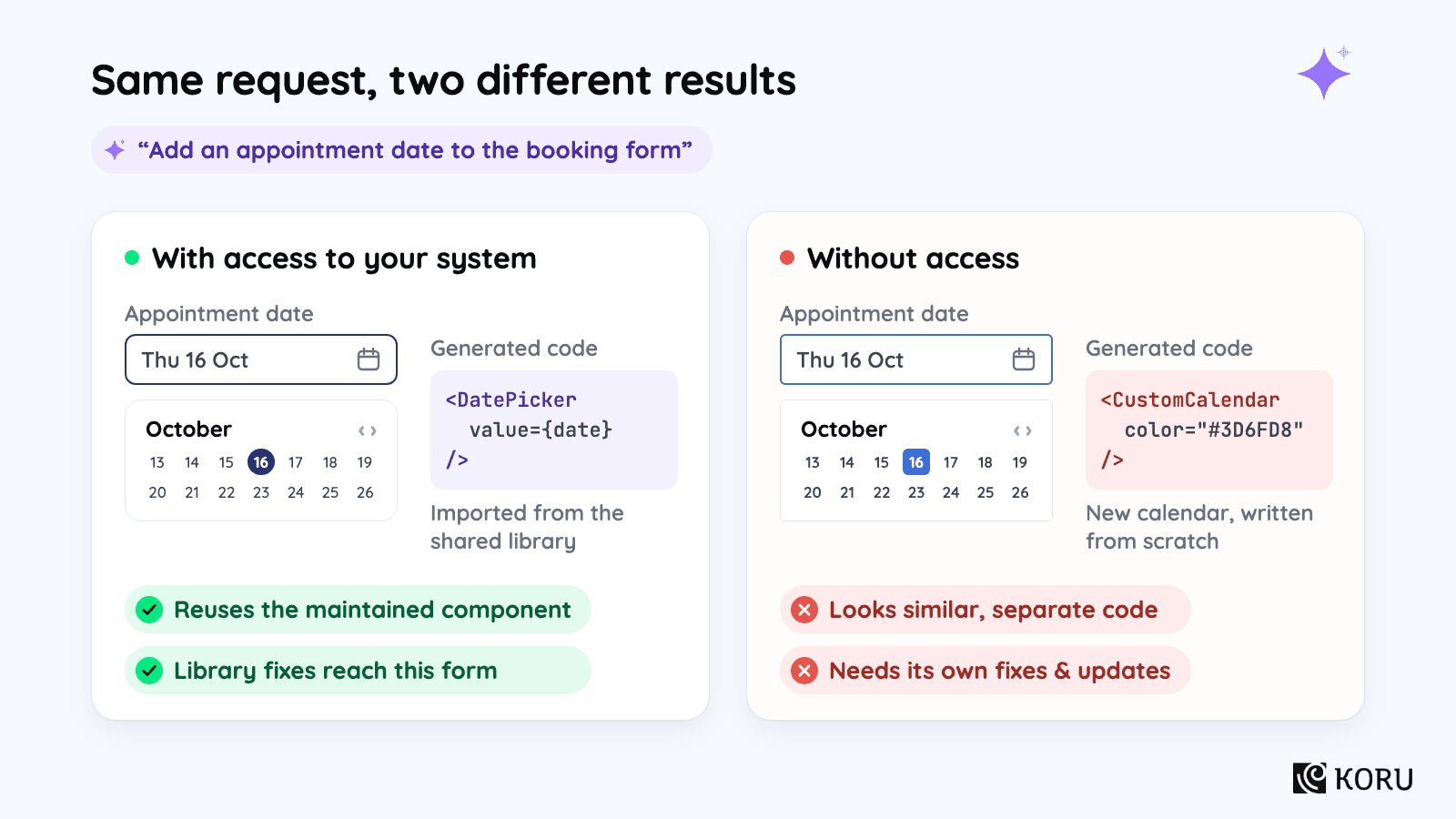
For example, a tool with access to your date picker can reuse it in a new form. Without that access, it may create a separate calendar that looks similar but needs its own fixes and updates.
Improve the system itself
AI can also help create a component library, update old styling, find inconsistencies, and draft documentation. Each task supports a different part of the design-system lifecycle:
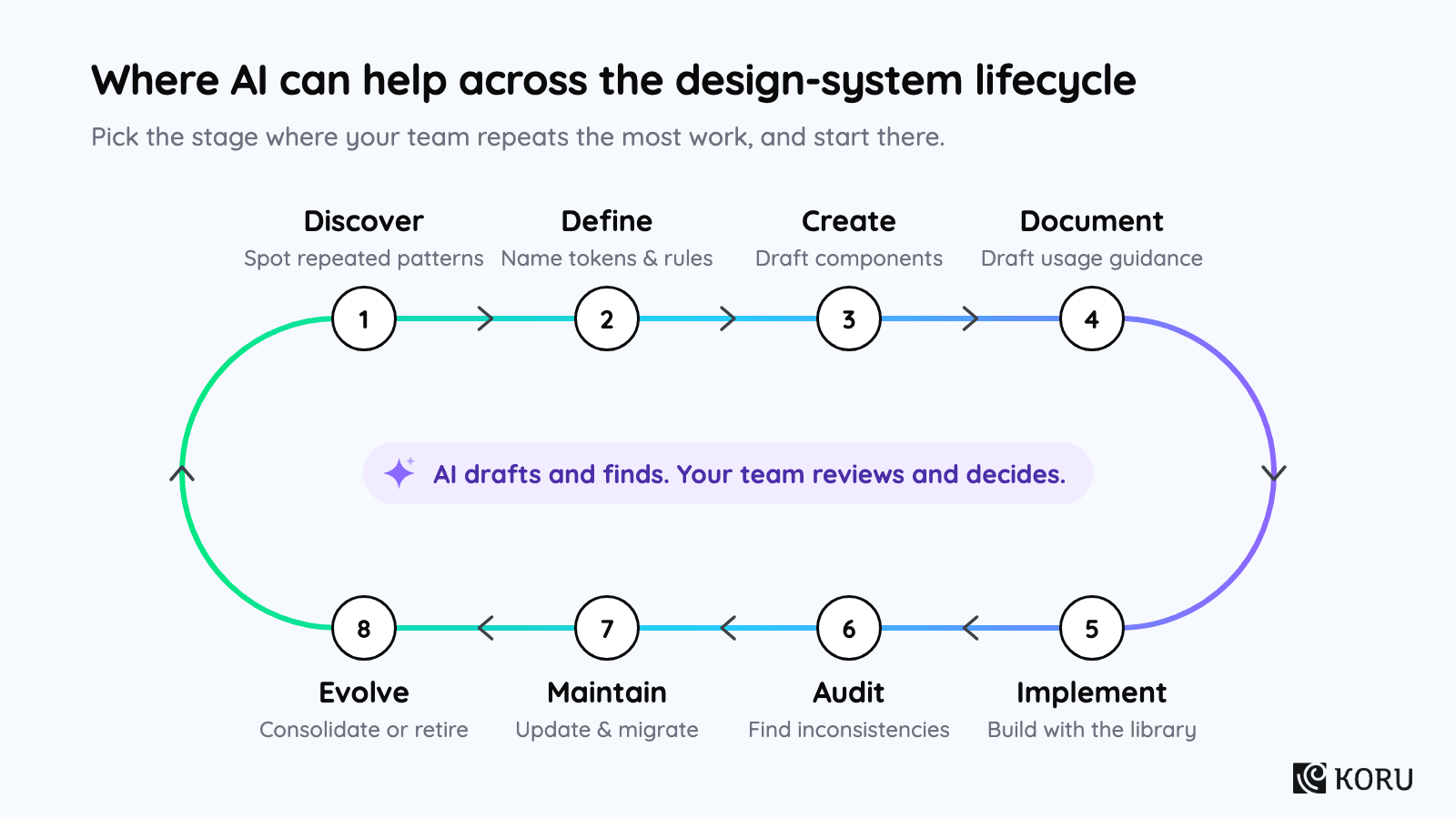
For example, an audit might find several buttons that look alike but use different code. AI can collect those examples for review. Your team can then decide whether they should use a shared component.
The right starting point depends on the work your team repeats. Choose a task with a clear output that someone can check.
Prepare your design system for AI
Making a design system AI-ready means giving AI tools access to its components and rules in a form they can use. A screenshot shows what a component looks like. The tool also needs to know how to build with it.
Start with a small set of commonly used components. Ask design and engineering to identify the current design, production code, and usage guidance for each one.
Use this checklist to find the gaps:
| Check | Ask the team | Why it matters |
|---|---|---|
| Reusable components | Do the needed components exist in design and production code? | Avoids generating replacements for work the team already maintains |
| Shared values | Are colors, spacing, typography, and other values defined as tokens? | Gives generated work named values to reuse and update |
| Usage guidance | Are supported states, variants, and important constraints documented? | Reduces guesses about how components should behave |
| Design and code mapping | Can the agent identify the coded component behind a design? | Helps it use the correct implementation |
| Access | Can the chosen AI tool retrieve the current sources? | Makes the information usable during the task |
| Validation | Can the team check component reuse, token references, and relevant behavior? | Catches output that looks right but bypasses the system |
| Ownership | Who updates the sources when the system changes? | Reduces the chance of future work using outdated guidance |
Define your tokens and components
Design tokens are named values for colors, spacing, typography, and other design choices. A semantic token names a purpose. For example, surface.card identifies the background of a card rather than a particular color.
If the team changes card backgrounds, a card that uses surface.card can pick up the new value. A card with a fixed color needs a separate fix. Check the token reference as well as the appearance.
Connect your tools and test them
Your AI tool needs a way to retrieve this information. That might be files in the code repository, component documentation, a design-tool integration, or a Model Context Protocol (MCP) server that provides access to relevant resources. Ask engineering which option fits your setup.
Example: Structured guidance at Atlassian
Atlassian organized component, token, and other design-system guidance into consistent schemas and supplied it through an MCP server. The schemas include usage guidance, code examples, properties, and accessibility requirements. [5]
In its evaluation, agents using the MCP server with structured content completed design-system tasks 34% faster than agents working without the server. The company also reported fewer errors and lower token use.
Atlassian’s evaluation shows why the organization of the guidance matters. Test whether your agent can find and apply your own system’s rules before relying on it for a full feature.
Test the connection by asking the agent to add one existing component to a small screen. Have a developer check that it imported the right component, used supported properties, and referenced shared tokens. Correct any missing guidance and try again.
Save the successful example with the component documentation. Keep it up to date as the component changes. Vitaly Friedman makes the same point about maintaining structured design-system specifications. [2]
Example: Component mapping at Coinbase
Coinbase updated its Figma Code Connect mappings so agents could find the production components behind its designs. The team compared three runs using the same design, prompt, and model, with and without Code Connect. [7]
Figma reports better component selection and design-system adherence. Across those runs, average token use fell 11.5% and implementation time fell 22.3%. These are results from a small controlled evaluation, not a forecast for every design.
When testing your connection, inspect the component imports as well as the screen. That shows whether the agent reused the maintained code.
Start with what you have
You can begin with a maintained library, a partial system, or a few repeated patterns. Use your starting point to decide what needs preparing first:
| Your starting point | A sensible first investment |
|---|---|
| A maintained library with matching production components | Connect the relevant components and guidance to AI, then test reuse |
| A good design library with inconsistent implementation | Reconcile the components needed for the pilot and establish their mappings |
| A growing product with scattered patterns | Consolidate a small set of frequently used patterns before generating more variations |
| A new product with little reusable infrastructure | Build and test a limited foundation alongside the first real workflow |
If you don’t have a component library
Build only the small set of components the workflow needs, then test them in product work. AI can help create that first version, but allow time to refine it.
In one of our projects, an LLM helped translate a legacy Tailwind and CSS-variable system into a Figma foundation with about 34 components. Months later, 262 of 263 tokens remained properly aliased, and the team was still building on the architecture.
The team later reduced the semantic layer from 30 tokens to 21 and added compositions the initial output had missed. The architecture remained useful, while product work revealed what needed changing. We did not measure a productivity gain in this project.
The lesson for a first project is to allow time for refinement. Test the generated components in a real workflow before expanding the library.
Choose your first AI project
Choose a small feature that solves a real customer problem and uses familiar components. Find a similar feature your team has already delivered so you have something to compare it with.
For the rest of this guide, we’ll use an appointment-rescheduling feature as an example. A patient chooses a new time, reviews the change, and confirms. It’s a useful first project if the product already has a scheduling service and calendar components. If it needs a new integration or unfamiliar clinical rules, choose a simpler task.
Decide what you want to produce
A prototype, an implementation-ready design, and a working feature are different deliverables. Choose one before starting so everyone knows what “done” means.
| Deliverable | What it needs to achieve | What completion means |
|---|---|---|
| Prototype | Help the team explore an idea or learn from users | Realistic enough to answer the research question; simulated behavior may be appropriate |
| Design ready for implementation | Explain the intended experience using the product system | Relevant flows, states, components, and product rules are defined and reviewed |
| Production implementation | Work within the actual product | Integrated code passes the team's relevant tests, reviews, and release requirements |
A rescheduling prototype can use invented appointment times to test whether patients understand the flow. The production feature must check real availability, save the change, and handle a slot being taken before confirmation.
Define the product rules
The design system can supply a date picker, a loading indicator, and an error message component. Their appearance and supported behavior are already defined.
Your product team still needs to decide which appointments can be moved, who has permission, and what happens after confirmation.
Include those decisions in the brief. The right error component cannot tell the agent which appointments a patient is allowed to move.
The design system provides part of what the team needs to deliver the feature:
Decide how to check the output
The checks depend on the task. Use this table to agree on what AI should produce and how you’ll review it:
| Use case | What AI can help produce | What the team should check |
|---|---|---|
| Build a foundation | Draft tokens, components, and documentation | Does the structure support actual product work? |
| Prepare an existing system | Draft guidance and help organize component information | Does it match the current implementation and decisions? |
| Design a feature | Assemble flows and screens from approved patterns | Are the relevant states and product requirements covered? |
| Implement a feature | Generate code using existing components | Does it reuse the library and behave correctly in the product? |
| Migrate a system | Propose replacements for old tokens or component usage | Are mappings correct and failures caught by checks? |
| Audit and maintain | Identify inconsistencies, duplicates, and stale guidance | Which findings are errors and which are intentional exceptions? |
| Evolve the system | Prepare evidence for consolidation or deprecation | Is the change worth the migration cost and future commitment? |
For a straightforward one-to-one replacement, a script may be enough. AI is more useful when the choice depends on context. Either way, check the result before using it.
Assign owners
Decide who will review the output, approve changes, and maintain the result. One person may cover several roles in a smaller team:
| Role | Responsibility |
|---|---|
| Feature PM | Define the customer problem, scope, product rules, and success measures; coordinate the pilot |
| Product leader | Decide whether the investment deserves capacity and whether it should expand across teams |
| Design lead | Own interaction quality, design patterns, relevant states, and design-system guidance |
| Engineering lead | Own technical integration, implementation quality, testing, and the path to release |
| Platform or design-system team | Maintain shared components, mappings, and supporting tools where that team exists |
| Relevant specialists | Review domain, accessibility, privacy, or other requirements within their remit |
If AI proposes a new calendar pattern, design and engineering should decide whether to adapt a shared component or keep it local to the feature. The PM makes sure someone owns that decision and the resulting maintenance work.
Write the brief
Bring the scope, components, owners, and success measures together in a short brief. Here’s what that could look like for appointment rescheduling:
| Field | Example |
|---|---|
| Customer problem | Users need a clearer way to choose and confirm a different appointment time |
| Scope | Select an eligible appointment, choose an available slot, review, and confirm |
| Existing assets | Calendar, form, button, loading, and feedback components; scheduling service |
| Product decisions | Eligibility, permissions, availability conflicts, confirmation, and notification behavior |
| Expected improvement | Spend less time building, reviewing, and correcting the feature, with the same quality requirements |
| Baseline | Time and effort on similar recent features; record the pilot setup separately |
| Completion | Reviewed experience, integrated implementation, relevant checks passed, and an agreed release decision |
| Decision after the pilot | Agree in advance what result would justify expanding, repeating after fixes, or stopping |
Before starting, record the time and effort spent on a comparable feature. Agree on the improvement that would make another pilot worthwhile and the quality requirements the feature must meet. Use your own baseline rather than a saving reported in another company’s case study.
Build and test a feature
With the brief agreed, build the feature in small parts. For rescheduling, start with slot selection. Review that before asking AI to generate confirmation and the rest of the flow.
1. Define the states
Describe the patient’s task, then work through the points where it can fail. For each state, tell the agent what the patient should see and what they can do next.
For example, “no appointments available” needs a message and an agreed next action. “Slot taken before confirmation” needs to explain the conflict and let the patient choose another time. A failed save needs to make clear whether the original appointment is still in place. Settle those behaviors with the team before generating the interface.
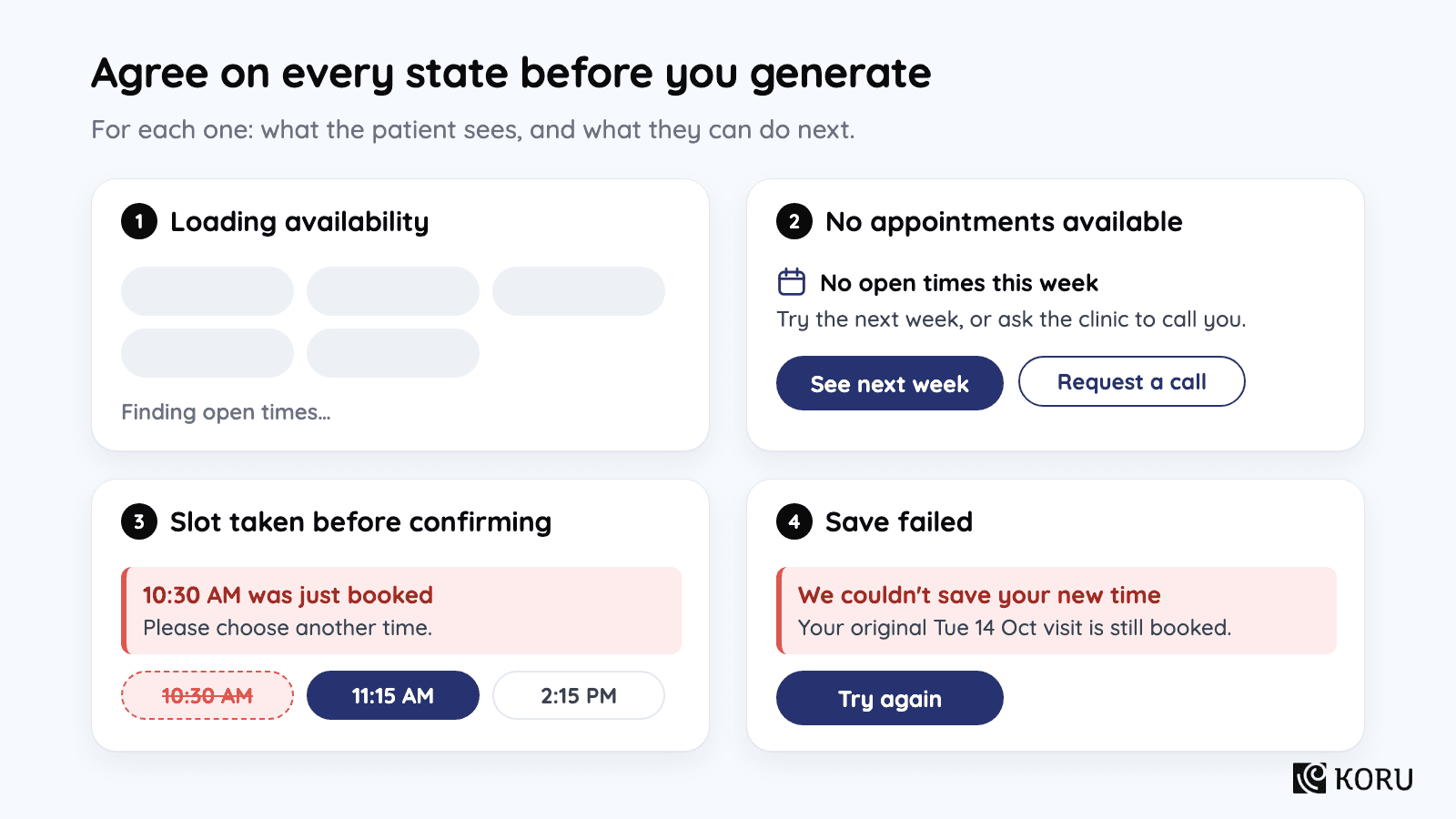
Ask AI to suggest other missing states, then have someone who knows the product review the list. Add the agreed cases to the brief and the feature checks.
2. Supply the components and rules
Give the agent the component code, usage examples, and agreed product rules alongside the task. A prompt for the first part of the flow could read:
Example prompt
“Build slot selection for appointment rescheduling using our existing date picker, buttons, and feedback components. Follow the component examples and shared tokens supplied with this task. Include loading, no-availability, and slot-unavailable states. Use the agreed messages and next actions for each. Flag any missing component or unclear rule for review.”
This approach is useful for prototypes too. Colin Matthews describes teams working with engineering to prototype from their real component libraries in Lenny’s Newsletter. The result can be closer to the product, though code still needs review and integration before release. [3]
3. Generate one part
Review slot selection with a designer and developer. Confirm that the loading, empty, and unavailable states behave as agreed. Then inspect the implementation: did it import the existing date picker and reference shared tokens, or create something that only looks similar?
If the agent makes the same mistake again, check its source material. An outdated example or missing usage rule can cause repeated corrections. Fix the guidance and rerun slot selection before asking it to build confirmation and the rest of the flow.
4. Test the implementation
Run the checks your team normally uses, including type checks, interaction tests, and automated accessibility checks where appropriate. Engineering can add checks for component imports or token references where those can be tested reliably.
Test product behavior separately. For rescheduling, confirm that the new appointment saves, an unavailable slot cannot be booked, and the expected notification is sent. The screen can use every approved component and still fail these tests.
5. Review the user experience
Have design and engineering walk through the experience with realistic content, involving relevant specialists where needed.
Try a calendar with no available slots, one with many options, and a long appointment description. Complete the task using a keyboard. After an error, check that the message is clear and focus moves somewhere useful. These checks show whether the patient can finish the task, which a screenshot cannot establish.
If review uncovers a rule that other features will need, add it to the shared guidance. That turns a correction on this feature into something the next one can reuse.
6. Release and record the effort
Take the feature through your usual integration, testing, and release process. Agree on who will monitor it and handle problems after release.
Keep a simple effort log throughout the pilot. Include setup, generation, integration, review, and fixes. Otherwise, a saving in design time can hide extra work in engineering or review.
Maintain your design system
AI tools will keep using the information you give them. When a component changes, update its examples and guidance too.
Assign an owner for those updates before more teams start using the workflow.
Use the same maintenance loop for findings from AI and other reviews:
Keep guidance up to date
For example, if engineering changes the date-picker API, update its usage examples and agent guidance in the same change where possible. Then rerun the small component task to check that the agent uses the new properties.
Where possible, have documentation and agent guidance draw from the same maintained source. Separate copies of a rule create more opportunities for one version to fall behind.
Review audit findings
AI can help find inconsistencies, but the team needs to investigate before making changes. Use this table to turn a finding into a review:
| Signal | What to investigate | Possible response |
|---|---|---|
| Hardcoded values | Did the implementation bypass a token, or is the value intentionally local? | Replace the value or document the exception |
| Similar components | Are teams solving the same problem independently? | Compare requirements before consolidating |
| Repeated review corrections | Is guidance missing, unclear, or inaccessible? | Improve the source and test it on the next task |
| Design and code differences | Which version reflects the intended behavior? | Reconcile the implementation and mapping |
| Stale documentation | Did a component change without its guidance changing? | Update both through the same workflow |
| Unused components | Are they obsolete, or intended for upcoming work? | Confirm plans before deprecating |
Before merging or removing components, check why both exist, who uses them, and what a migration would affect. A visual similarity alone is a weak reason to standardize.
Example: Token migration at Island
Island migrated more than 12,000 token instances from legacy styling classes to tokens that support themes. The company reported 98.75% accuracy, with about 150 issues corrected manually. [6]
It used scripts for clear one-to-one replacements and AI for choices that depended on context. The team split the work into smaller parts and visually reviewed screens and states in both themes.
Lint rules in continuous integration then blocked disallowed token families in migrated areas. Those rules helped prevent later code from undoing the migration.
For a similar migration, define how ambiguous choices will be reviewed and add checks that prevent the old patterns from returning.
Review changes before approving them
AI can gather evidence for changes to the system. People still need to weigh that evidence against the roadmap and the work a change would create.
Choosing a standard
Ask AI to compare usage, overlap, accessibility findings, and implementation effort. Then check the proposal against your roadmap, ownership, and migration capacity.
Adding a component
Ask it to find similar components and show where they fall short. Design and product should decide whether the new pattern serves a recurring need or just this feature.
Removing a component
Low usage is a reason to investigate. Check upcoming work and affected teams before deprecating a component; a migration still needs an owner and a plan.
Applying design principles
A new workflow may expose a conflict between principles such as simplicity and consistency. Ask AI to describe the alternatives and their consequences, then have the responsible people decide which trade-off fits the product.
For each proposal, ask for the affected components, current usage, alternatives, migration effort, and a recommendation. That gives the owner something concrete to review.
Use each project to improve the next
Turn recurring problems into updates to the system. The feedback loop is:
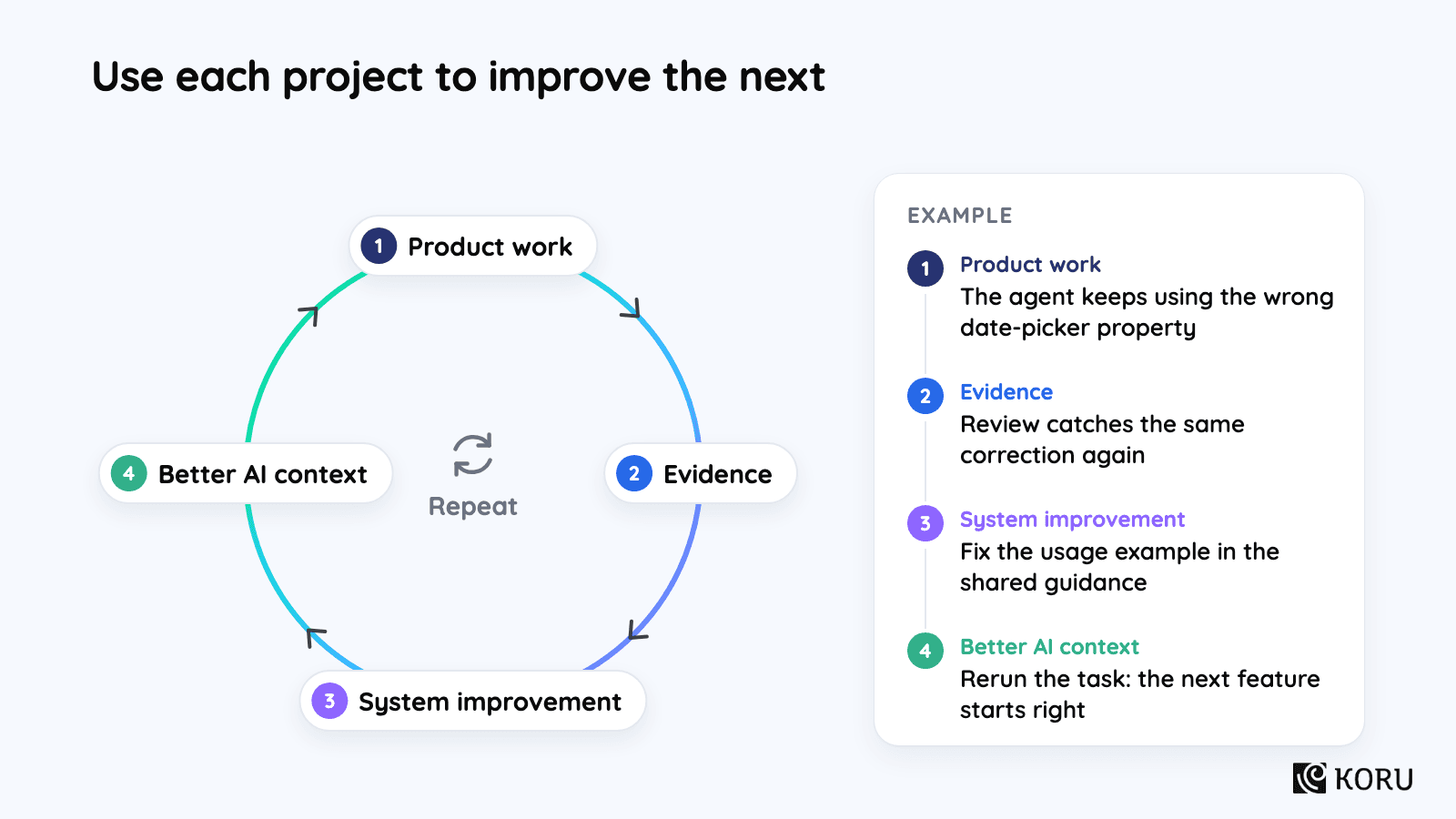
If the agent repeatedly uses the wrong date-picker property, correct the example and rerun the task. If several features need the same missing pattern, consider adding it to the library. Document intentional exceptions so future audits can recognize them.
Budget for ongoing maintenance
Include maintenance, onboarding, and tool costs as more teams adopt the workflow. Assign ownership of the component mappings and agent guidance.
Carlos Gonzalez de Villaumbrosia makes a related argument in Product School’s founder letter: gains from individual AI tools can stall when the team’s workflow stays the same. Shared ownership needs funding alongside the tools. [4]
Measure the results
Compare the project with the similar feature you chose at the start. Did it take less time and effort to deliver? Did it meet the same quality requirements?
Count setup, generation, integration, review, and fixes. Keep the initial setup separate so you can estimate the cost of repeating the work. Include tools and maintenance when judging the overall saving.
Track the whole task
| Measure | What to record | What it helps you decide |
|---|---|---|
| Delivery time | Elapsed time from agreed scope to release, including waits | Did the feature reach users sooner? |
| Team effort | Time spent on design, implementation, review, and fixes | Was work removed or transferred elsewhere? |
| Reuse and adherence | Approved components and tokens used; avoidable duplicates introduced | Is the output building on the system? |
| Remediation | Corrections required and time spent making them | Is the generated work economical to integrate? |
| Quality | Defects, missing states, regressions, and relevant accessibility findings | Is speed coming with acceptable product quality? |
| Operating cost | Tool costs, shared maintenance, and ongoing support effort | Is the approach sustainable at the intended scale? |
| Drift | Divergence from current definitions after later changes | Does the benefit last beyond initial delivery? |
| Product outcome | The user or business measure the feature was intended to improve | Did the delivered work solve a worthwhile problem? |
Also check whether the feature solved the customer problem. For rescheduling, that might mean measuring how many patients complete the change without contacting support. Faster delivery alone won’t answer that question.
Check the comparison
Note differences that weaken the comparison, such as a simpler flow or a more experienced developer. Use the first result to decide what to test next, rather than forecast savings across the roadmap.
If generation was fast but integration took longer, record both. Reuse, correction time, and later drift help explain whether the approach is improving as the team repeats it.
Choose the next step
Use the evidence to decide whether to expand, fix the approach, keep it for a narrower purpose, or stop:
| Result | Next move |
|---|---|
| Lower total effort with acceptable quality | Extend to another comparable workflow and check whether the benefit repeats |
| Faster generation but substantial corrections | Fix the recurring context, component, or validation gaps before expanding |
| Better prototypes but little implementation reuse | Keep the workflow for discovery and assess production delivery separately |
| Little benefit relative to setup and maintenance | Narrow the use case or stop investing in that approach |
Start with one feature and use the result to make the next decision. You should be able to explain what AI reused, what the team had to fix, and whether repeating the approach is worth the effort.
Sources and further reading
- [1] Courtney Kyle, Pendo. Why we rebuilt the visual foundation of Pendo and why it matters for your product team. July 1, 2026. pendo.io/pendo-blog/why-we-rebuilt-the-visual-foundation-of-pendo
- [2] Vitaly Friedman, Smashing Magazine. How To Make Your Design System AI-Ready. June 3, 2026. smashingmagazine.com/2026/06/how-make-design-system-ai-ready
- [3] Colin Matthews, Lenny's Newsletter. How to get your entire team prototyping with AI. June 10, 2025. lennysnewsletter.com/p/how-to-get-your-entire-team-prototyping
- [4] Carlos Gonzalez de Villaumbrosia, Product School. The Operating Model is the Product Why We Built Product Partners. Updated May 21, 2026. productschool.com/blog/news/the-operating-model-is-the-product-why-we-built-product-partners
- [5] Atlassian. Teaching AI to speak our design language. atlassian.com/blog/ai-at-work/teaching-ai-to-speak-our-design-language
- [6] Boaz Hoch, Island. Teaching AI to Migrate Code. July 21, 2026. island.io/blog/teaching-ai-to-migrate-code
- [7] Jenny Xie, Figma. How Coinbase used Code Connect to guide agents and shrink token costs. September 2, 2026. figma.com/blog/how-coinbase-used-code-connect-to-shrink-token-costs
Ready to Build a Scalable UX Practice?
Our embedded team model empowers you to transition from tactical UX fixes to a fully scalable, strategic UX practice - aligned with your business goals and built for healthcare's unique challenges.



QUICK LINKS
VERTICALS
FIND US AT
INDIA
6/8, Kumar City, Wadgaon Sheri, Pune 411014

© 2026 Koru UX Design LLP